Overview tab (Designs)
Design name, description, type (customizable or fixed), active status, and the preview and SVG uploads.
Where to find it
Customizer → Designs → click a design → Overview.
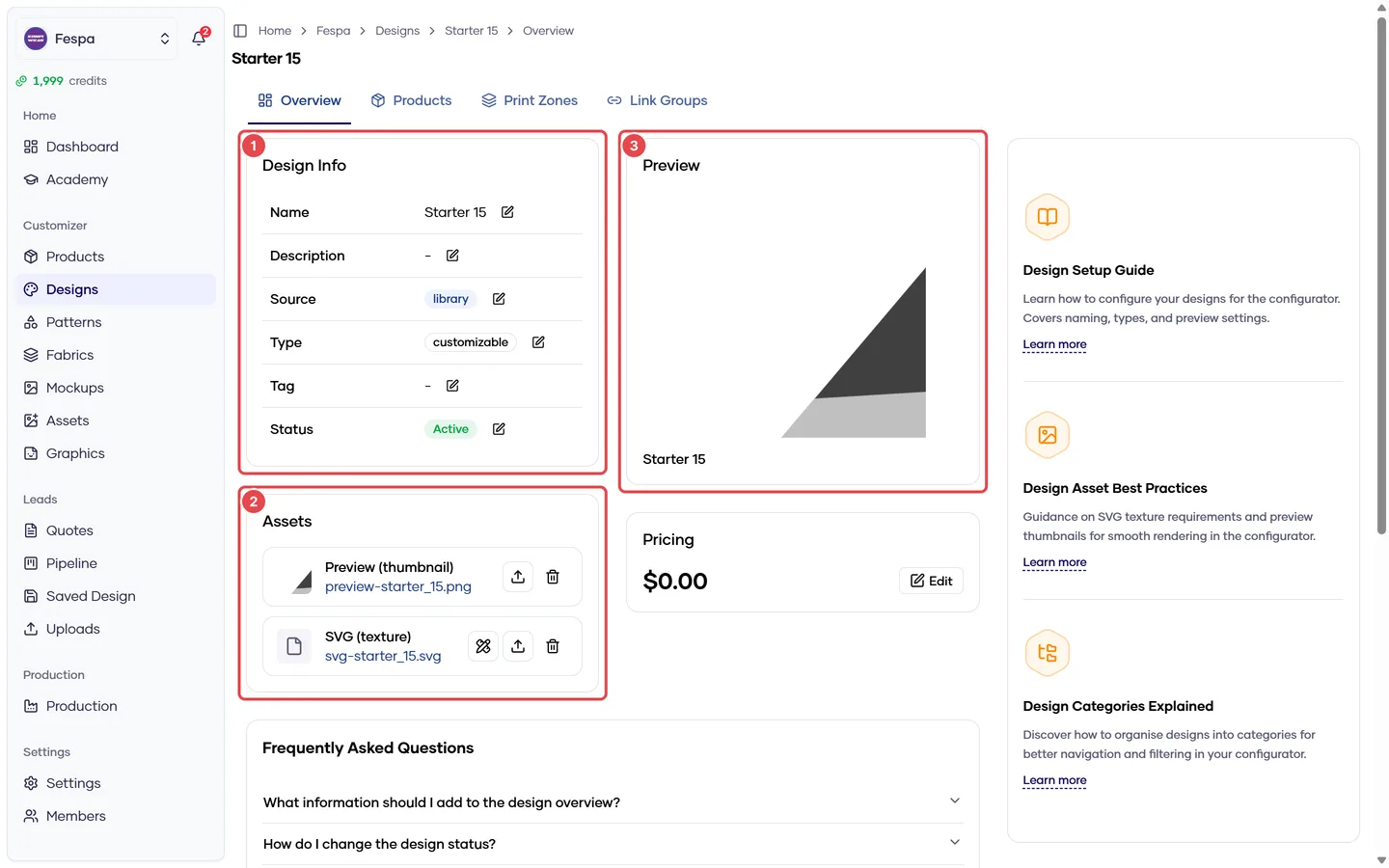
- Design Info (name, type, status)
- Assets (preview image and SVG)
- Preview
Cards on this tab
Design Info
| Field | Meaning |
|---|---|
| Name | Shown in the storefront design picker |
| Description | Internal note; not shown to customers |
| Type | Customizable — customers recolor zones. Fixed — selectable but not editable |
| Source | custom, library or starter (read-only) |
| Status | Active = visible in the storefront |
Assets
- Preview — PNG / JPG / WebP thumbnail.
- SVG — the texture applied to the model. Replacing it takes effect in the storefront after the cache refreshes (about a minute).
Preview card
Read-only render of the current preview image.
Common questions
I uploaded a new SVG but customers still see the old one. Wait a minute and hard-refresh. If it persists, check that the upload finished (the slot shows the file name) — a closed tab during upload leaves the old file in place.
Can I delete a design that is used in quotes? Yes. Deletion is a soft delete: the design disappears from the dashboard and storefront, but existing quotes keep their snapshot and production files can still be generated.