Looking for the legacy Konfiwear platform?Click here to sign up
KonfiwearKonfiwear
  • Pricing
Newsletter

Discover the latest Konfiwear features, improvements and product updates

Be the first to explore new capabilities, performance improvements, and tools designed to elevate your workflow.

You can unsubscribe at any time. See our privacy policy for how we handle your data.

KonfiwearKonfiwear

Empowering your custom apparel business with advanced 3D design tools and seamless integrations.

Market & Industry
  • Print-on-Demand
  • Promotional
  • Sportwear
  • Packaging
Solutions
  • Web-to-Print
  • 3D Clothing Configurator
  • Direct-to-Garment
  • Apparel Mockups
Resources
  • Features
  • Blog
  • Documentation
  • API Reference
  • Changelog
Company
  • Contact
  • Press Kit

© Copyright 2026 Konfiwear V2. All Rights Reserved.

Privacy PolicyTerms of ServiceCookie Policy
Web-to-Print3D Clothing ConfiguratorDirect-to-GarmentApparel Mockups
Print-on-DemandPromotionalSportwearPackaging
Pricing
FeaturesBlogDocumentationAPI ReferenceChangelogLegacy Konfiwear

Command Palette

Search for a command to run...

    • Create a workspace
    • Onboarding wizard
    • Choose a plan
    • Setup checklist
    • Troubleshooting

Command Palette

Search for a command to run...

    • Create a workspace
    • Onboarding wizard
    • Choose a plan
    • Setup checklist
    • Troubleshooting

Products

Create garments and configure their Overview, Category, Pricing, Print Zones and Sizes tabs.

A product is one garment your customers can customize: a 3D model, the sizes it comes in, how it is priced, where artwork may be printed and which category it is listed under.
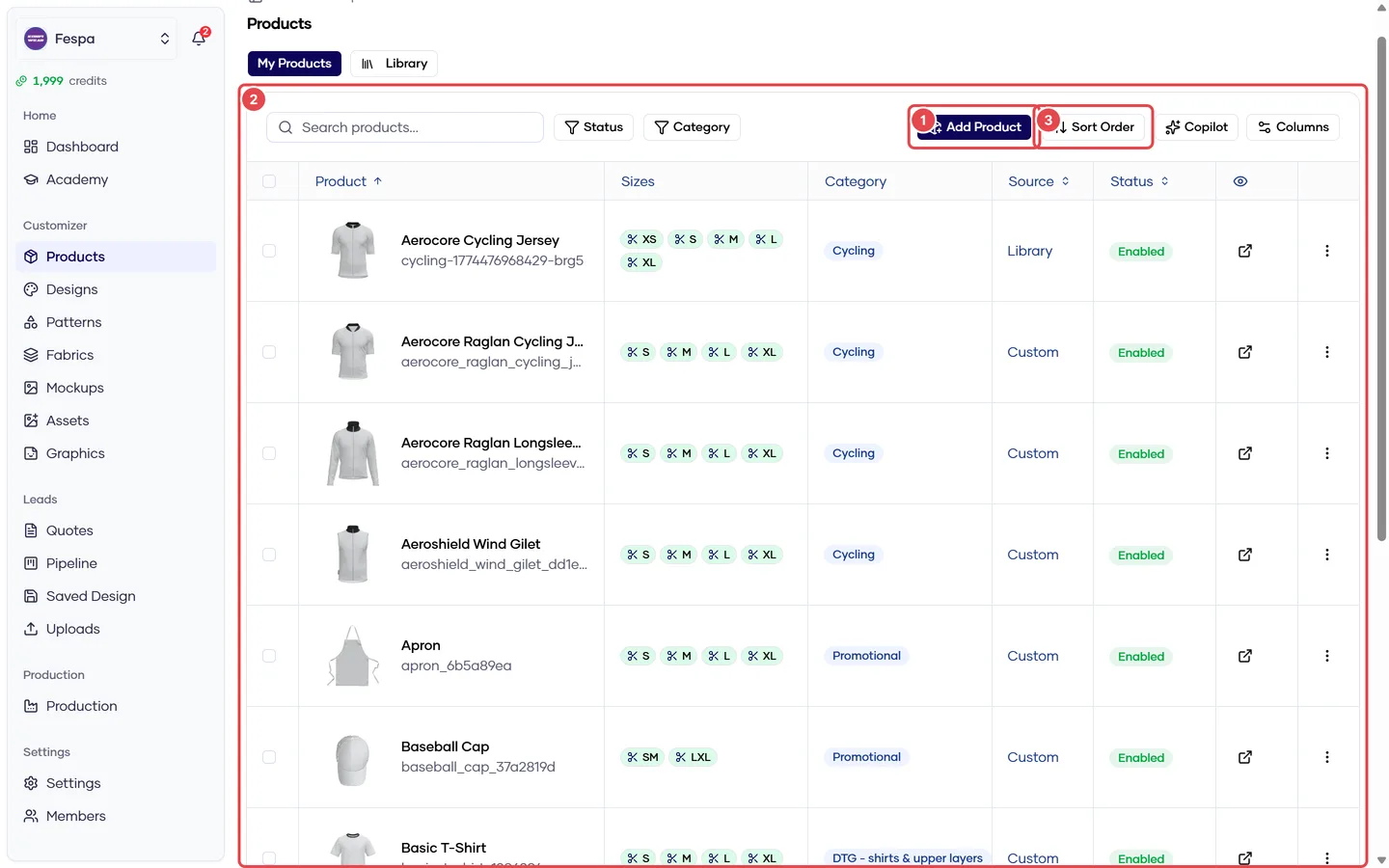
Products list with the Add product button, the catalog table and the Sort order link highlighted.
  1. Add product
  2. Your catalog (search, status and category filters)
  3. Sort order

Open a product and you get five tabs. Each tab has its own article below.

In this section

  • Create a product
  • Overview tab — name, code, status, 3D model and other assets
  • Category tab — where the product appears in the storefront
  • Pricing tab — quantity-based price tiers
  • Print Zones tab — where customers can place graphics and text
  • Sizes tab — size run, per-size patterns and measurements
  • Bulk edit, reorder and default product
Was this article helpful?

Still stuck? Email support — include your workspace slug and a screenshot.