How Credits Work in Konfiwear: A Manufacturer's Guide to AI, Print Files & Library Costs
A complete breakdown of Konfiwear's credit system — what each action costs, how to earn and top up credits, and how apparel manufacturers can budget usage.
Every apparel manufacturer running on Konfiwear eventually asks the same question: "what exactly am I paying for when I generate an AI graphic or export print files?" The answer is credits — a single, metered currency that sits underneath every AI-powered and production-heavy feature on the platform.
This guide breaks down exactly how credits work, what each action costs, how you earn and top up your balance, and how to budget usage so you're never caught off guard mid-production.
Why Credits Instead of Flat Pricing
Bundling AI generation, vectorization, and print-file exports into a flat subscription fee punishes light users and under-charges heavy ones. A small team that occasionally generates a mockup shouldn't pay the same as a manufacturer running hundreds of print jobs a month.
Credits solve this by decoupling usage from your base plan. Your subscription tier sets your monthly allowance and unlocks features; credits are what you actually spend when you use them. Run AI heavily one month and print files the next — you pay for what you use, not what a rigid add-on tier assumes you'll use.
What Consumes Credits
Six actions on Konfiwear are metered. Every cost below is fixed — there's no variability by file size or complexity.
| Action | Credits | Cost at base rate ($0.10/credit) |
|---|---|---|
| AI graphic generation (customizer) | 6 | $0.60 |
| AI vectorization | 4 | $0.40 |
| Print-ready file generation (per job) | 4 | $0.40 |
| Product Library — clone a full product | 500 | $50.00 |
| Product Library — clone a fabric | 250 | $25.00 |
| Product Library — clone a design | 100 | $10.00 |
A few things worth calling out:
- You're only charged on success. If an AI generation or print-file job fails, you keep your credits — print-file jobs that fail after a charge was applied are automatically refunded.
- Library clones are one-time. Once you clone a product, fabric, or design from the Product Library, it's permanently yours to edit — there's no recurring cost.
- Costs are flat regardless of complexity. A simple print file and a multi-zone, multi-color print file both cost 4 credits.
- The AI Copilot assistant is not credit-metered. It runs on a separate monthly message allowance tied to your plan, not your credit balance.
How You Get Credits
There are two ways credits land in your balance: your subscription grants them monthly, or you buy them directly.
Monthly Plan Grants
Every plan includes a monthly credit allocation that refreshes when your subscription invoice is paid:
| Plan | Monthly Grant |
|---|---|
| Starter | 0 |
| Pro | 50 |
| Enterprise | 200 |
Two important rules here:
- Unused credits do not roll over. Whatever's left when your next invoice pays out stays in your balance (it isn't clawed back) — but you also don't accumulate a growing monthly surplus indefinitely; the grant is simply added on top.
- Starter plans grant 0 credits per month. If you're on Starter, every AI generation, print file, or Library clone comes out of a top-up pack you purchase.
Top-Up Packs
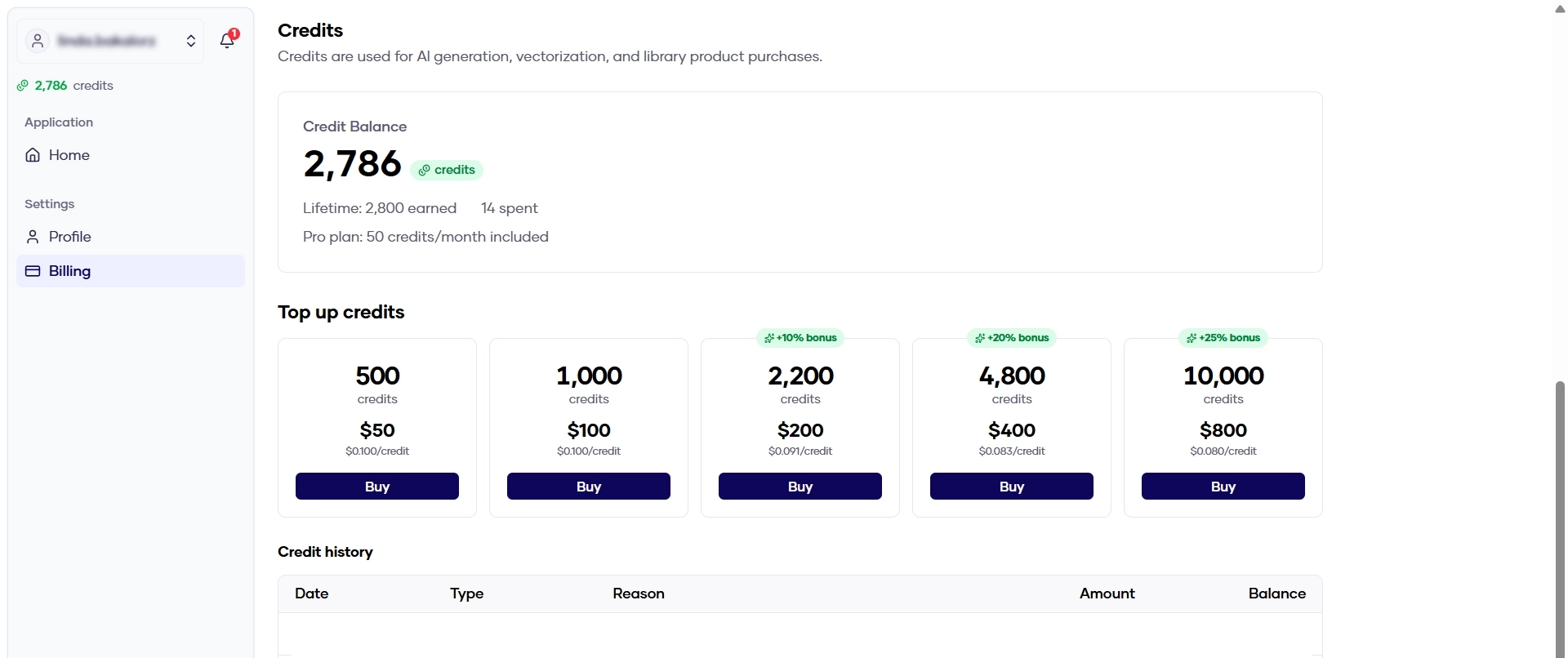
Need more than your monthly grant covers? Buy a pack any time from your billing page — credits land instantly, no subscription change required:
| Package | Price | Credits | $/credit | Bonus |
|---|---|---|---|---|
| topup_50 | $50 | 500 | $0.100 | — |
| topup_100 | $100 | 1,000 | $0.100 | — |
| topup_200 | $200 | 2,200 | $0.091 | +10% |
| topup_400 | $400 | 4,800 | $0.083 | +20% |
| topup_800 | $800 | 10,000 | $0.080 | +25% |
Larger packs carry a meaningful discount — if you know you'll be running a high-volume production month, buying the $800 pack instead of two $400 packs saves you roughly 4% on top of the already-discounted rate.
What Happens When You Change Plans
- Upgrading (e.g. Starter → Pro): your next paid invoice grants the new plan's monthly amount. No partial-month proration on credits.
- Downgrading (e.g. Pro → Starter): your next grant drops to the new plan's amount, but any credits already in your balance stay put — nothing is clawed back.
- Cancelling: your existing balance remains usable for as long as your account exists, even without an active subscription, as long as you have credits from prior grants or top-ups.
- Free trials: no invoice is paid during a trial, so no monthly grant is issued — trial accounts run entirely on any top-up credits purchased.
Tracking Your Balance and Spend
Every credit-consuming action shows its cost upfront before you commit, and your spending is fully auditable after the fact:
- Sidebar balance badge — always visible while you work, color-coded so a glance tells you where you stand (comfortable, running low, or critical)
- Billing → Credit Balance — your current balance plus lifetime totals earned and spent
- Billing → Credit History — a full record of every grant, top-up, consumption, and refund, with a timestamp and the exact action that triggered it
- Cost confirmation — before an AI generation or Library purchase runs, you see the exact credit cost and can back out
- Insufficient-credit notice — if a balance is too low for an action, you're shown exactly how many credits you're short, with a direct link to buy more
- Email alerts — you're notified once your balance drops to 10 credits or runs out entirely, so a production run doesn't stall mid-job without warning
You'll never see a duplicate charge for the same job, even if a print file needs to be regenerated after a hiccup.
Budgeting Credits as a Manufacturer
A few practical rules of thumb for planning your monthly credit spend:
- Estimate your AI + print-file volume first. If your team runs roughly 50 AI generations and 30 print-file exports a month, that's
(50 × 6) + (30 × 4) = 420credits — well beyond a Pro plan's 50-credit grant, so plan to top up accordingly. - Use the Product Library to jump-start your catalog, not to save on production credits. Cloning is a one-time cost against your catalog-building budget, not your ongoing production spend — treat it separately from monthly AI/print forecasting.
- Compare the marginal cost of a bigger top-up pack against your plan tier. If you're regularly buying $400+ in top-ups every month, it's worth checking whether an Enterprise plan's larger monthly grant (200 credits) offsets enough of that spend to be the better deal.
- Bank credits ahead of a known production spike. Since balances never expire and unused credits aren't clawed back on downgrade, buying a larger pack before a seasonal rush (team orders, back-to-school, tournament season) avoids a mid-production insufficient-balance interruption.
Quick FAQ
Do credits expire? No. Credits stay in your balance indefinitely once granted or purchased — there's no expiry window to race against.
Does my whole team share one credit pool? Yes. All activity under a team workspace bills against the workspace owner's balance — there's a single shared pool per organization, not per seat.
What if a print-file job fails? You're not charged unless the job succeeds. If a charge was already applied and the job subsequently fails, the credits are automatically refunded.
Can Konfiwear support adjust my balance? Yes, in limited cases — support can apply a manual credit adjustment (positive or negative) to resolve billing issues, and every adjustment is logged in your credit history like any other transaction.
Get Started
- Check your balance — look at the credit indicator in your dashboard sidebar
- Review your history — visit Billing → Credit History to see exactly what you've spent and on what
- Top up before you run low — buy a pack from Billing any time, credits apply instantly
Understanding your credit spend is the first step to running a predictable, cost-controlled production pipeline on Konfiwear.