So integrieren Sie Konfiwear-Webhooks in Ihren benutzerdefinierten Warenkorb (Schritt für Schritt)
Leitfaden für Entwickler: Aktivieren Sie den „Save/API“-Modus, empfangen Sie signierte Design-Webhooks, überprüfen Sie Signaturen, übergeben Sie Ihren eigenen Sitzungskontext über den Iframe und fügen Sie konfigurierte Artikel zu einem beliebigen benutzerdefinierten Warenkorb oder zur Kasse hinzu.
Was Sie erreichen werden
In diesem Tutorial werden Sie Konfiwear mithilfe des Save/API-Modus mit jeder von Ihnen verwalteten Plattform verbinden – sei es ein OpenCart-Shop, ein individueller PHP-Shop oder eine Headless-Storefront. Wenn ein Kunde die Gestaltung im 3D-Konfigurator abgeschlossen hat und auf die CTA-Schaltfläche klickt, sendet Konfiwear die vollständigen Design-Daten an Ihren HTTPS-Endpunkt: Vorschaubilder, Preise, Größenaufschlüsselung und Verweise auf Produktionsdateien. Von dort übernimmt Ihr Code – legen Sie den Artikel in den Warenkorb, erstellen Sie eine Bestellung, ganz nach den Anforderungen Ihres Workflows.
Wenn Sie Shopify oder WooCommerce nutzen, brauchen Sie all das nicht – verwenden Sie stattdessen die nativen Warenkorb-Integrationen. Der „Save/API“-Modus ist für alle anderen gedacht.
Voraussetzungen:
- Ein Konfiwear-Arbeitsbereich mit Zugriff auf den Save/API-Modus
- Admin-Zugriff auf die Einstellungen Ihres Arbeitsbereichs
- Ein öffentlich erreichbarer HTTPS-Endpunkt, der
POST-Anfragen empfangen kann
Am Ende haben Sie:
- Den Save/API-Modus aktiviert, wobei Ihre Webhook-URL konfiguriert und getestet ist
- Eine Signaturüberprüfung, die Ihren Endpunkt vor gefälschten Anfragen schützt
- Ihren eigenen Sitzungskontext, der von Ihrer Seite über den Customizer-Iframe zurück zu Ihrem Server fließt
Schritt 1 – Speichern/API-Modus aktivieren
- Öffnen Sie in Konfiwear Ihren Team-Arbeitsbereich.
- Gehen Sie zu Einstellungen → Global → Call to Action.
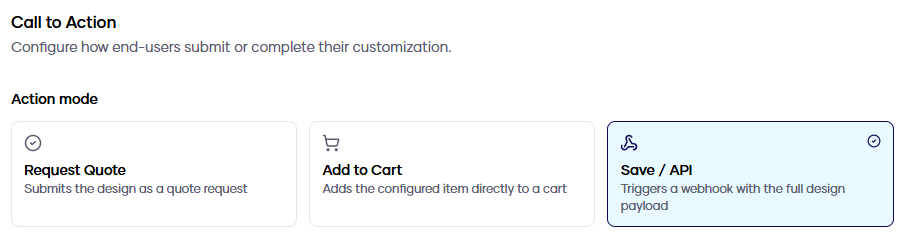
- Wählen Sie unter Aktionsmodus die Option Speichern / API aus.
- Geben Sie im Feld Webhook-URL Ihren HTTPS-Endpunkt ein (zum Beispiel
https://shop.example.com/konfiwear/webhook). - Klicken Sie auf Test senden – Konfiwear sendet eine Beispiel-Nutzlast an Ihren Endpunkt und zeigt Ihnen den HTTP-Status sowie die Antwortzeit an.
- Klicken Sie auf Änderungen speichern.
Schritt 2 – Die Nutzdaten verstehen
Wenn ein Kunde ein Design absendet, erhält Ihr Endpunkt ein design.saved.v3-Ereignis:
{
  "event": "design.saved.v3",
  "transaction_id": "order-draft-8841",
  "session": {
    "id": "uuid",
    "passthrough": { "s": "your-echoed-value" }
  },
  "products": [
    {
      "product": { "code": "jersey", "name": "Jersey" },
      "quote": { "quote_id": "uuid", "quote_number": "QR-1001" },
      "design": { "size_breakdown": { "m": 2, "l": 1 } },
      "pricing": { "unit_price": 42,63, "total": 127,89, "currency": "EUR" },
      "assets": {
        "previews": [{ "status": "ready", "url": "https://..." }],
        "techpack": { "status": "pending", "url": null }
      }
    }
  ]
}
Hier sehen Sie eine echte Übermittlung, die in einem Webhook-Debugger überprüft wurde – beachten Sie die Request-Header X-Konfiwear-Event und X-Konfiwear-Signature neben dem JSON-Body:
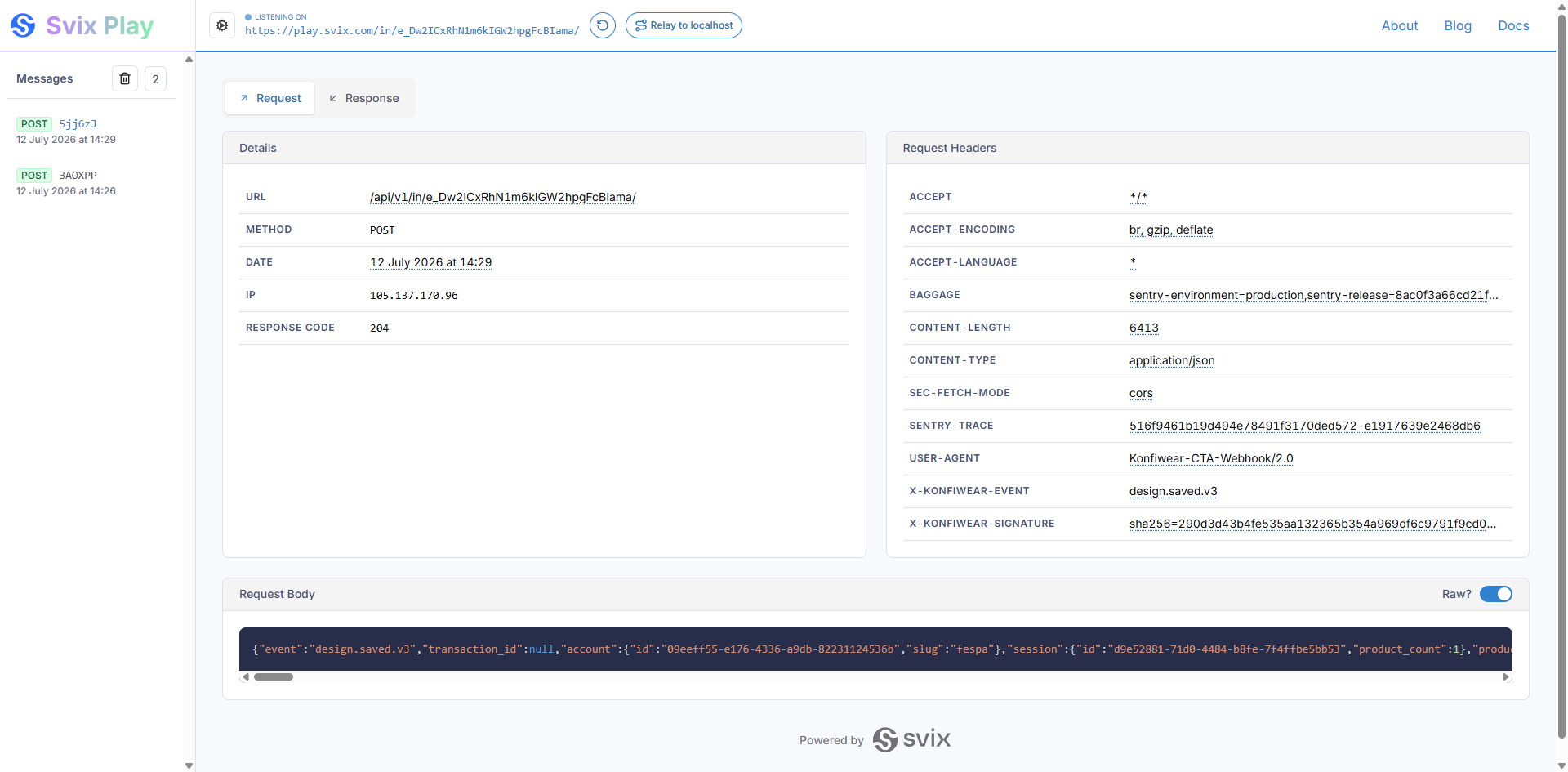
transaction_id– eine Referenz, die Sie in die Customizer-URL einfügen und die an Sie zurückgegeben wird (Schritt 4).session.passthrough– zusätzliche Werte, die Sie für die Rückgabe konfiguriert haben, ebenfalls aus der URL (Schritt 4). Nur vorhanden, wenn konfiguriert.quote_id– die eindeutige ID dieser Übermittlung. Verwenden Sie sie zur Duplikatserkennung.assets– Vorschaubilder sowie Produktionsdateien. Techpacks und Druckdateien werden im Hintergrund generiert; sie werden zunächst als„pending“angezeigt, und ein nachfolgendesdesign.assets.ready-Ereignis wird an dieselbe URL gesendet, sobald jede Datei fertig ist.
Schritt 3 – Signaturen überprüfen (empfohlen)
Bevor Sie irgendetwas im Webhook-Body als vertrauenswürdig einstufen, vergewissern Sie sich, dass die Anfrage tatsächlich von Konfiwear stammt.
Generieren Sie Ihren geheimen Schlüssel: Klicken Sie unter Einstellungen → Global → Call to Action → Webhook-Signierung auf Geheimen Schlüssel generieren und kopieren Sie ihn sofort – er wird genau einmal angezeigt. Speichere es in einer Umgebungsvariablen, niemals in deinem Code oder Repository. Sollte es jemals bekannt werden, generiere es neu und aktualisiere deine Umgebung.
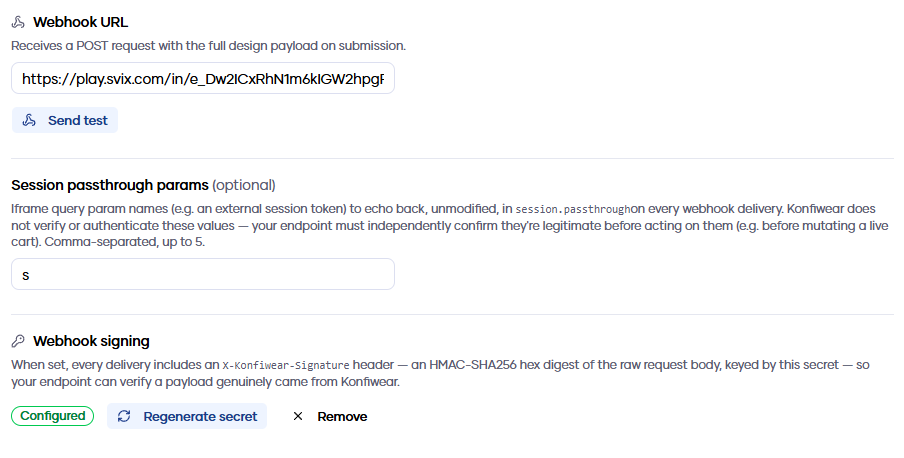
X-Konfiwear-Signature-Header – einen HMAC-SHA256 des Anfragetextes. Überprüfen Sie ihn wie folgt:$rawBody = file_get_contents('php://input');
$secret = getenv('KONFIWEAR_WEBHOOK_SECRET');
$expected = 'sha256=' . hash_hmac('sha256', $rawBody, $secret);
$provided = $_SERVER['HTTP_X_KONFIWEAR_SIGNATURE'] ?? '';
if (!hash_equals($expected, $provided)) {
http_response_code(401);
exit;
}
$payload = json_decode($rawBody, true); // kann sicher verarbeitet werden
import { createHmac, timingSafeEqual } from 'node:crypto';

function isValidSignature(rawBody, header, secret) {
  const expected =
    'sha256=' + createHmac('sha256', secret).update(rawBody).digest('hex');

  return (
    header?.length === expected.length &&
    timingSafeEqual(Buffer.from(expected), Buffer.from(header))
  );
}
Die häufigste Falle: Überprüfe immer anhand des rohen Request-Körpers. Wenn dein Framework das JSON zuerst parst und du es anschließend wieder in eine Zeichenkette umwandelst, stimmt der Digest nicht überein.
Schritt 4 – Den Customizer einbetten und deinen eigenen Kontext übergeben
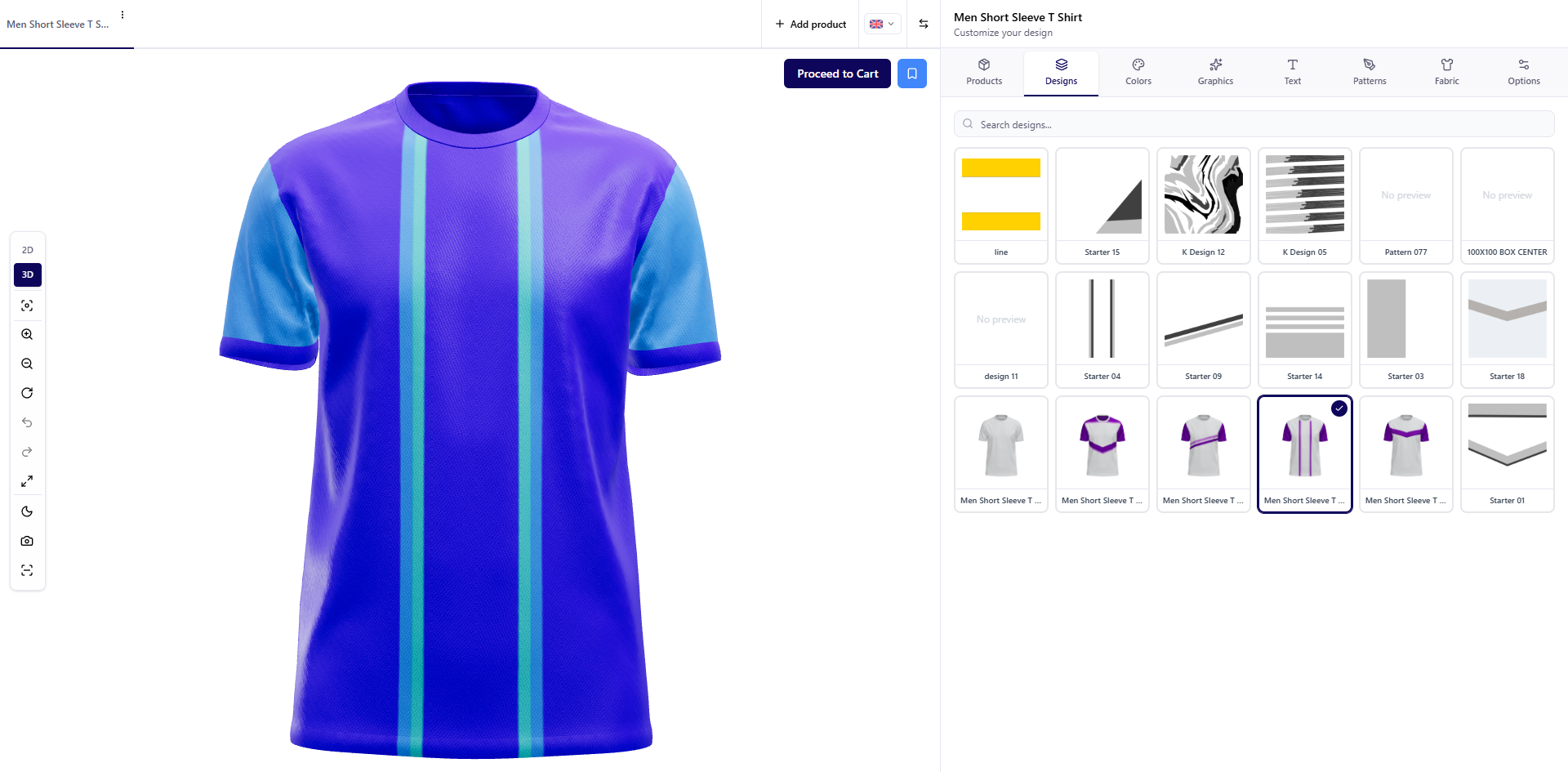
Die meisten Save/API-Integrationen betten den Customizer in einen iframe ein. Die Herausforderung: Wenn der Webhook auf Ihrem Server eintrifft, woher wissen Sie dann, welchem Ihrer Käufer er gehört? Sie können sich nicht auf Ihr Session-Cookie verlassen – Browser blockieren Third-Party-Cookies in iframes. Übergeben Sie stattdessen Ihren Kontext über die URL und lassen Sie ihn von Konfiwear zurückgeben.
transaction_idFüge der URL, die du in den iframe lädst, eine Referenz deiner Wahl an:
https://your-domain/c/your-team/jersey?transaction_id=order-draft-8841
Konfiwear gibt diesen in jedem Webhook für diese Sitzung wortwörtlich zurück. Generieren Sie ihn serverseitig, speichern Sie ihn in Verbindung mit der Sitzung des Käufers, und Sie verfügen über einen zuverlässigen Verknüpfungsschlüssel.
Benutzerdefinierte Parameter: Session-Passthrough
Wenn Ihre Plattform bereits ein Session-Token unter einem eigenen Parameternamen (z. B. s) generiert:
- Fügen Sie unter Einstellungen → Global → Call to Action den Parameternamen zu den Session-Passthrough-Parametern hinzu.
- Fügen Sie ihn an Ihre Iframe-URL an:
...?s=7a6f2ca2f15d3a691aaac9ecbc - Lesen Sie ihn aus dem Webhook unter
session.passthrough.saus.
Es werden nur Parameternamen aus Ihrer konfigurierten Zulassungsliste zurückgegeben – alle anderen Elemente in der URL werden ignoriert. Die Namen design, quote, rev, saved und transaction_id sind reserviert.
Konfiwear sendet außerdem eine Browser-Meldung an Ihre übergeordnete Seite, wenn eine Übermittlung erfolgreich war (konfiwear:design.saved), sodass Ihr Frontend sofort reagieren kann – eine Bestätigung anzeigen, zum Warenkorb weiterleiten –, ohne Ihren Server abzufragen.
Schritt 5 – Sicherer Umgang mit dem Webhook
Die üblichen Sicherheitsregeln für Webhooks gelten für Konfiwear genauso wie für Stripe oder Shopify:
- Überprüfe zuerst die Signatur. Deine Webhook-URL ist über das öffentliche Internet erreichbar; die Signatur ist das Schloss. Lehne alles ab, was die Überprüfung nicht besteht.
- Behandle die zurückgegebenen Werte als Nachschlage-Schlüssel, nicht als Authentifizierung.
transaction_idundsession.passthroughstammen aus einer URL im Browser eines Käufers. Verwenden Sie sie, um die passende Sitzung in Ihrem eigenen Shop zu finden, und vergewissern Sie sich, dass es sich um eine von Ihnen ausgestellte und noch aktive Sitzung handelt – bevor Sie etwas in einen aktiven Warenkorb legen. - Überprüfen Sie die Preise erneut anhand Ihres eigenen Katalogs, bevor Sie jemandem etwas in Rechnung stellen – genauso, wie Sie eingehende Bestelldaten erneut überprüfen würden, bevor sie in den Zahlungsfluss gelangen.
- Führen Sie eine Deduplizierung anhand von
quote_iddurch, damit ein erneuter Lieferversuch keine doppelte Bestellung erzeugt. - Schnell bestätigen, asynchron verarbeiten. Sie haben 10 Sekunden Zeit, um einen 2xx-Status zurückzugeben – speichern Sie die Nutzdaten, antworten Sie mit
200und führen Sie die aufwendigen Aufgaben (Downloads, Warenkorbänderungen, ERP-Aufrufe) in einem Hintergrundjob aus.
Zusammengenommen sieht ein robuster Handler wie folgt aus:
POST-Anfrage empfangen
  → Signatur des Rohtextes überprüfen          (bei Ungültigkeit ablehnen)
  → Nach Duplikaten anhand von `quote_id` suchen                      (200 zurückgeben, falls bereits vorhanden)
  → Passthrough-Token im eigenen Shop nachschlagen  (bei Unbekanntheit ignorieren)
  → Nutzdaten speichern, Hintergrundauftrag in die Warteschlange stellen
  → 200 zurückgeben
Hintergrundauftrag
  → Preis anhand des eigenen Katalogs erneut validieren
  → Artikel in den Warenkorb legen / Bestellung erstellen
Fehlerbehebung
| Symptom | Mögliche Ursache |
|---|---|
| Kein Webhook empfangen | Aktionsmodus ist nicht „Speichern“ / „API“, Webhook-URL fehlt oder ist nicht HTTPS, oder Ihr Endpunkt hat nicht innerhalb von 10 Sekunden geantwortet |
session.passthrough fehlt | Parameter-Name steht nicht auf Ihrer Zulassungsliste, ist nicht in der iframe-URL enthalten oder es handelt sich um einen reservierten Namen |
| Signatur-Header fehlt | Kein Signaturschlüssel konfiguriert – generieren Sie einen unter „Webhook-Signierung“ |
| Signatur stimmt nie überein | Sie hashen einen neu serialisierten Body statt der rohen Anfrage-Bytes |
Die URL der Produktionsdatei ist null | Dateien werden im Hintergrund generiert – warten Sie auf das Folge-Ereignis design.assets.ready |
Bereit zum Erstellen?
Der „Save/API“-Modus verwandelt Konfiwear in ein Design-Frontend für jeden E-Commerce-Stack, den Sie einsetzen. Aktivieren Sie ihn unter Einstellungen → Global → Call to Action, richten Sie die Signaturprüfung ein, und Ihre Plattform erhält jedes konfigurierte Design mit Preisen, Vorschauen und angehängten Produktionsdateien.
Starten Sie Ihre kostenlose Testversion und verbinden Sie Konfiwear noch heute mit Ihrer Plattform.